Showing posts with label accessdata. Show all posts

Monday, October 25, 2010

Blackberry IPD files and FTK 3.2

I was curious as to FTK's ability to analyze RIM Blackberry IPD files.  I imported 7 backup files - some were "Autobackups" and others were manually created backup files.  The process of importing them was as simply as pointing to a live directory, and you are given the option of creating a image of the files or working from the "live files".

After the processing was complete (took about 1 minute), here's what the files looked like within FTK:
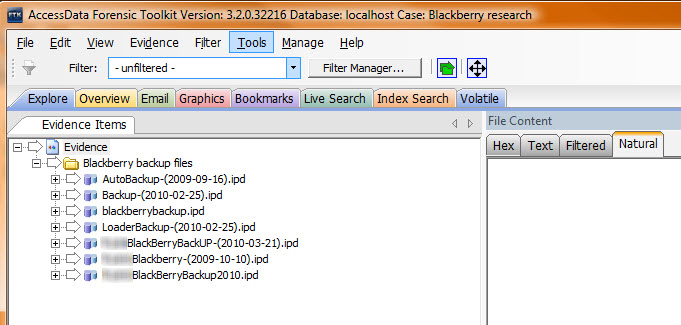

When you open up each of the IPD archives, you will note 89 different fields; some are populated with information and some are empty.  The fields which have data within them will most often produce HTML files which start with rows_0000000_0000xxx.html.  The .html report can be viewed and read quite readily in the "filtered" or "natural" mode.  There are some other formats as well.  The image below shows the database-type format in which the data appears.


An exception to the "row_000..." format is noted below.  You will note that the directory structures indicates that the parsed data is stored within "blobs".  Each of the 89 fields had a folder titled "blob", although many did not contain any data.  In the absence of any noteable file structure, I would think that this would refer to Binary Large Objects (string of binary with no associated code).  In the example below, the "Content Store" folder had several files.  Several of the files were images, which had file names blob_Data_00000xx, where xx was a number.  The numbers appeared to be incremental.  (image was purposely blurred for privacy).  Other files within the folder include exif data for the images - FTK "Properties" show that these files were created by the FTK carving process.  FTK was able to carve out images from the IPD files, although the number of images I retrieved (4) would suggest that the images were not truly "carved" from any undeleted area.  The properties of the carved images show that they were carved from "Blackberry backup files/blackberrybackup.ipd>>tables>>Content Store>>blobs>>blob_Data00000xx.>>Carved [120].jpeg" (where xx is an incremental number).  The path references a full-size photo, whereas the carved image appears to be thumbnail size.


When you open up the Case Overview tab, you'll see that many of the files have been categorized into the noted fields.


Email was nicely extracted, and displayed in traditional FTK format.  The fields appeared to parse out quite nicely.


And lastly, FTK has always been known for it's indexed search capability.  The following two images reinforce the power of FTK in finding results within the compound IPD file.  I would suspect that use of the Indexing feature will make it easier to identify areas where evidentiary information may be stored; whether the information was parsed out or not.


When you compare the output with that of ABC (Amber's Blackberry Converter), FTK does not parse out nearly the amount of information available from ABC; but, it does appear to provide us a more "forensic" approach to data whereby the data can be more easily validated against the raw data.

I'm am guessing that more fields will be retrievable as versions develop.  Overall, another great improvement in FTK 3.2.


Friday, October 22, 2010

Updated Windows Registry and Mac resources & Jad's Software....updated

As several sites have rightfully pointed out....Accessdata has made a huge jump ahead with their recent release of FTK Imager v3.0.  (not to mention FTK 3.2 and their most recent "Volatile tab.")   Just finished testing it today by mounting physical images and using VFC to virtually boot XP and Win7 systems.  Flawless!    While wandering around their site (actually looking for updated RSR files to add to their most recent Registry Viewer version), I stumbled across two additional documents that I believe are very worthy of a good read - or at least printing out as a permanent reference.

Registry Quick Find Chart - a very recently updated 34-page reference documenting Registry locations for the standard 5 Registry files.  The document has a few new columns in the document - one which lists what versions of Windows the reference pertains to (ie: XP, Vista or Win7) and a second column that states when the Registry reference is updated (immediately, when document opened, at logon...)    This document would also be great starting reference to initiate further research on Registry locations and extractable artifacts.  D/L it....know it....print it and keep it handy!

Mac System Artifacts - another reference document which provides 7 pages of Mac Artifact locations.  With FTK's amazing ability to parse out the Mac OS (including Plists), this document is another one to print off.  Updated in 2010.

Jad has also updated three of his applications:
Internet Evidence Finder (IEF) - updated to v3.6 to handle recent updates to Facebook Live chat.  Commercial - Cdn $49.00; Free for Law Enforcement.
FChat - updated to v1.20.    Commercial - Cdn $29.99
FJF - Facebook JPG finder - updated to v1.2.1.  Currently free for use.

Sunday, October 3, 2010

Kindle 3G Wireless Reading Device - forensically speaking

Having just acquired the new model of Kindle, I got to wondering what kind of information was stored on the device and if necessary, how would I go about accessing this information in the most forensically-sound manner possible.  Here's what I found.

1.  Using a Digital Intelligence Tableau Ultrablock USB write-blocker, I connected my forensic computer to the device through the micro-USB cable that was provided with the Kindle. 
2.  Realizing that it was necessary to power on the device, I did so.  I noted the date/time to compare this with the date/time stamps that were likely to change upon boot. 
3.  When powered on, I immediately checked to ensure the 3G/Wireless was turned off.  Select "Menu", toggle the five-way controller up to "Turn Wireless Off" and select the five-way controller (center button).  Alternatively, I could conduct the acquisition within our Faraday tent.
4.   Using FTKImager v2.9.0.5, identified the physical drive attributed to the Kindle.


5.  As noted, the drive recognized as "Kindle Internal Storage" with a size of 3240MB.  I noted that this differs from the stated size of the device (4GB).  Specifically, Amazon states the device has "Storage 4GB internal (approximately 3GB available for user content)."  I then acquired the physical drive as a RAW (DD) format to allow a more robust selection of analysis tools.

Here's what the partition looks like:


And contents of the "documents" directory:


6.  Made note of the filesystem, and VBR header - as noted in the following screenshot.


The filesystem is FAT32, formatted with mkdosfs - DOS formatting within a Linux environment.  From looking at the USER partition which was available, I'm asking whether the SYSTEM partition is ARM Linux Kernel (?).

While admittedly, my Kindle had not been populated with a lot of user interaction, the Kindle definitely does not appear to readily give up information.  It was obvious what books and documents were on my Kindle, and what the last document I accessed was, but as far as other artifacts,  my brief analysis was not overly productive.  I have surfed the Internet, opened several websites and likely populated the device with considerable Internet History.  I could not readily locate any of this history.


Just for heck of it, I through Jad's Internet Evidence Finder at it - nothing.   I'm thinking that a GREP search for Internet History might have more success.  I'm also interesting in running a search for my Wireless Access Point SSID and see what other artifacts might show up.

Other things I found:
- IMEI (3G) information on the device.
-  lots of deleted information.
- a significant number of dictionary terms (including in the unallocated space).

Eric Huber has a posting on the Kindle at A Fistful of Dongles - more great information.

More to come....perhaps I'll see how a boot CD such as Caine interacts with the device.  I'm going to continue to see what the imaged USER image is willing to give up in terms of forensic artifacts.  ps..EnCase will also be involved.

Any thoughts or ideas are welcome.

Sunday, July 4, 2010

The iPhone and Corporate Security

I have done my fair share of mobile analyses over the last 4-5 years including logical extractions of Blackberry's and both logical and physical extractions of iPhones.  With a larger number of cellular providers carrying iPhones, I am often asked to compare the Blackberry to the iPhone within a corporate domain.

While I understand that the iPhone is constantly increasing the number of "apps" that they carry, I simply cannot find a logical reason why a corporation (who presumably does not want company information/secrets shared with the world) would opt to incorporate the iPhone into it's corporate enterprise.

As recent as last week, I was reminded that many corporations will almost always opt for "availability" over "confidentiality".  While I believe that both are important, I simply do not see why a company would so severely sacrifice data integrity as to choose the iPhone over the Blackberry. 

Let's look at a few ideas with which to draw a comparison:
- the iPhone allows both a logical and full physical extraction of it's user partition.
- the iPhone password can be bypassed with a known commercial technique.
- Insofar as data, the iPhone retains vasts amount of data in relatively easy to extract/read format.  The use of EnCase and FTK to analyze a physical iPhone partition exposes just how robust the information is.

- there are no commercial techniques to bypass the Blackberry password (yes, I know about BES pwd resets, looking for IPD backups, etc).
- Blackberry does not seem to have jumped on the "app train", pushing out new apps each day. (this is good, no?)

So I ask....beyond being the "new kid with a new toy", why are companies asking about iPhones and security?

Last time I did an iPhone analysis, I mentioned to my colleagues that we ought to be classifying the iPhone analysis the SAME as a full Mac analysis.  File structure, artifacts, geo information, Internet History, Email, ....  it may just be my .02 cents, but any company with any sense of security ought to give this a very long, hard look before seriously considering an iPhone within their corporate domain.

ps...note to Apple....why has it taken you so long to realize this.  (or have you already realized it and simply believe that pushing out "apps" for the home market would be more lucrative?  (huh?))

Thursday, October 29, 2009

FTK 3.01 and IEF

I realize that there are many who are still sore over the troubles with v2.0 of FTK. But I've been using v3.01 (x64) for a few weeks now, and I'm quite impressed. While there are a few of the nagging issues that continue to annoy me (lack of ability to use "sweeping bookmarks"), the product seems to have integrated several other features that make up for these other small annoyances. First of all, it's MUCH faster. Remember trying to sort a column in v1.8x - no more! The time to sort a column, remove checkmarks, load images.... everything seems to move much faster. I like the integration of Registry reporting, indexed search results and the flexible reporting options. The carving and sorting of files into various categories is impressive. If only you could find a way to make it easier for an investigator to go through thousands of HTML pages in search for emails, banking artifacts, etc!

Admittedly, I installed FTK onto a new clean machine but colleagues in our office have upgraded from v2.0x and are also seeing similar advantages.

My suggestion to Accessdata - more research and whitepapers ie: Vista Registry, more information on using FTK for Mac analysis, etc.

Overall, very impressed by these significant upgrades and improvements.


Also, take a look at Jad's site. He's been busy working on his program, Internet Evidence Finder and has made some significant improvements - now up to v2.07. A quick poll at our last office meeting - over 1/2 of our investigators are using his product. Keep it coming Jad- much appreciated!

Wednesday, September 2, 2009

Accessdata Imager Lite and RAM


Accessdata has recently released it's lite version of Imager, which now has the ability to image RAM - Imager v2.6.1. The full install version came out a while back, but recently they update their lite version. Haven't had an opportunity to test it beyond 32-bit XP, but the free all-in-one product is appealing. Only tools you'll need is forensically clean USB Thumbdrive. Give yourself some room to spare and consider imaging the RAM to the thumbdrive. I'm waiting for information on the memory footprint. Updates like this certainly add polish to v2.2.1 of it's full FTK product which I've recently added to my arsenal. Take my word - it's now worth the upgrade from v1.8.
Next.....speed. I'm really thinking that my new Digital Media card - SanDisk Extreme III -(30MB/Sec) may allow faster acquisition. Certainly faster than my cheap $9 thumbdrive. Time to dig out the benchmark software.